HEXO的Next主题引入mermaid流程图插件
一、概述
Mermaid(美人鱼)是一种基于Javascript的绘图工具,使用类似于Markdown的语法,使用户可以方便快捷地通过代码创建图表。
项目地址:https://github.com/mermaid-js/mermaid
Mermaid支持以下类型的图形:
- 流程图:使用
graph关键字,具体用法后文将详细介绍 - 饼状图:使用
pie关键字,具体用法后文将详细介绍 - 序列图:使用
sequenceDiagram关键字 - 甘特图:使用
gantt关键字 - 类图:使用
classDiagram关键字 - 状态图:使用
stateDiagram关键字 - 用户旅程图:使用
journey关键字
二、HEXO如何引入mermaid插件
对于hexo-theme-next主题插件,从8.11.0版本开始内置mermaid支持,不再需要手工安装js模版文件了,具体步骤为:
确认
hexo-theme-next的版本号高于8.11.0确认已安装
hexo-filter-mermaid-diagrams,当前版本号是1.0.5;如果没有安装,则:1
npm install hexo-filter-mermaid-diagrams
找到位于HEXO根目录的
_config.next.yml,寻找mermaid段落并设置开关enable: true1
2
3
4
5
6
7# Mermaid tag
mermaid:
enable: false # 此处修改为true!!!
# Available themes: default | dark | forest | neutral
theme:
light: default
dark: dark此时应该可以在文档中编写并展现流程图了。
如果不能正常展示,可能需要重新生成js文件,输入命令:1
npm clean && npm generate && npm server
其实,vscode也可以引入mermaid,其插件名称是
Markdown-preview-enhanced
三、常用图形示例
使用时需要在代码块声明中标注mermaid,然后内容体中表明图形类型,再逐一描述各个节点信息。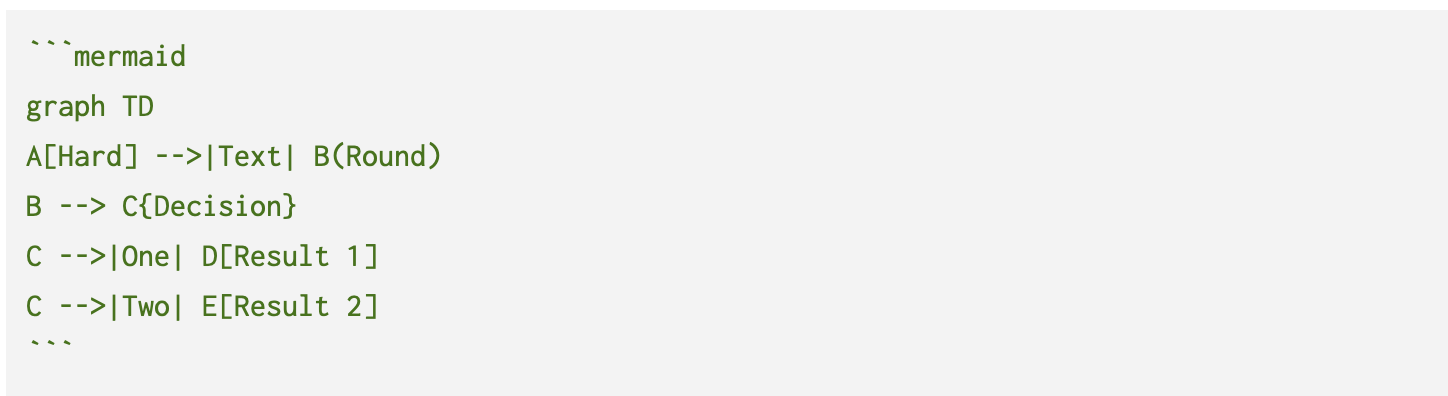
1. 流程图(graph关键字)
1 | graph TD |
graph TD
  A[Christmas] -->|Get money| B(Go shopping)
  B --> C{Let me think}
  C -->|One| D[Laptop]
  C -->|Two| E[iPhone]
  C -->|Three| F[fa:fa-car Car]
2. 饼图(pie关键字)
1 | pie |
pie
  title 为什么总是宅在家里?
  "喜欢宅" : 15
  "天气太热或太冷" : 20
  "穷" : 500
饼图最多支持9种不同的颜色
3. 时序图(sequenceDiagram关键字)
1 | sequenceDiagram |
sequenceDiagram
  Alice->>John: Hello John, how are you?
  loop Healthcheck
      John->>John: Fight against hypochondria
  end
  Note right of John: Rational thoughts!
  John-->>Alice: Great!
  John->>Bob: How about you?
  Bob-->>John: Jolly good!
4. 甘特图(gantt关键字)
1 | gantt |
gantt
section Section
  Completed :done, des1, 2014-01-06,2014-01-08
  Active       : active, des2, 2014-01-07, 3d
  Parallel 1   : des3, after des1, 1d
  Parallel 2   : des4, after des1, 1d
  Parallel 3   : des5, after des3, 1d
  Parallel 4   : des6, after des4, 1d