一、概述 对标 Jenkis 自动化 CI/CD 工具,Gitlab 开发了自己的 Gitlab CI/CD,Github 原来是和 Tranvis 合作的,后来也开发了自己的 Actions,Gitea 没有自己的 CI/CD 工具,而是“借用”了 Actions,改了个名字就是 Gitea Actions。
和其他 CI/CD 解决方案一样,Gitea 不会自己运行 Job,而是将 Job 委托给 Runner。从安全和性能的角度考虑,Runner 通常运行在一台独立的服务器上,例如安全域边界的堡垒机。
Gitea Actions 的 Runner 被称为act_runner,是一个用 Go 语言编写的程序。https://gitea.com/gitea/act_runner ,当前最新版本是 0.2.11。
act_runner 其实是 nektos/act 的一个分支
二、技术架构 GitHub Actions 有一些自己的术语。
workflow (工作流程):持续集成一次运行的过程,对应为一个 yaml 文件
job (任务):一次持续集成的运行,包含一个或多个 jobs。对应为一个 Container 实例
step(步骤):执行 job 的若干个步骤,一步步完成。类似于 Gitlab CI 的 stage
action(动作):每个 step 可以依次执行一个或多个命令(action)。可以是一条 bash 指令,也可以是一个在 Github Market 上架的脚本
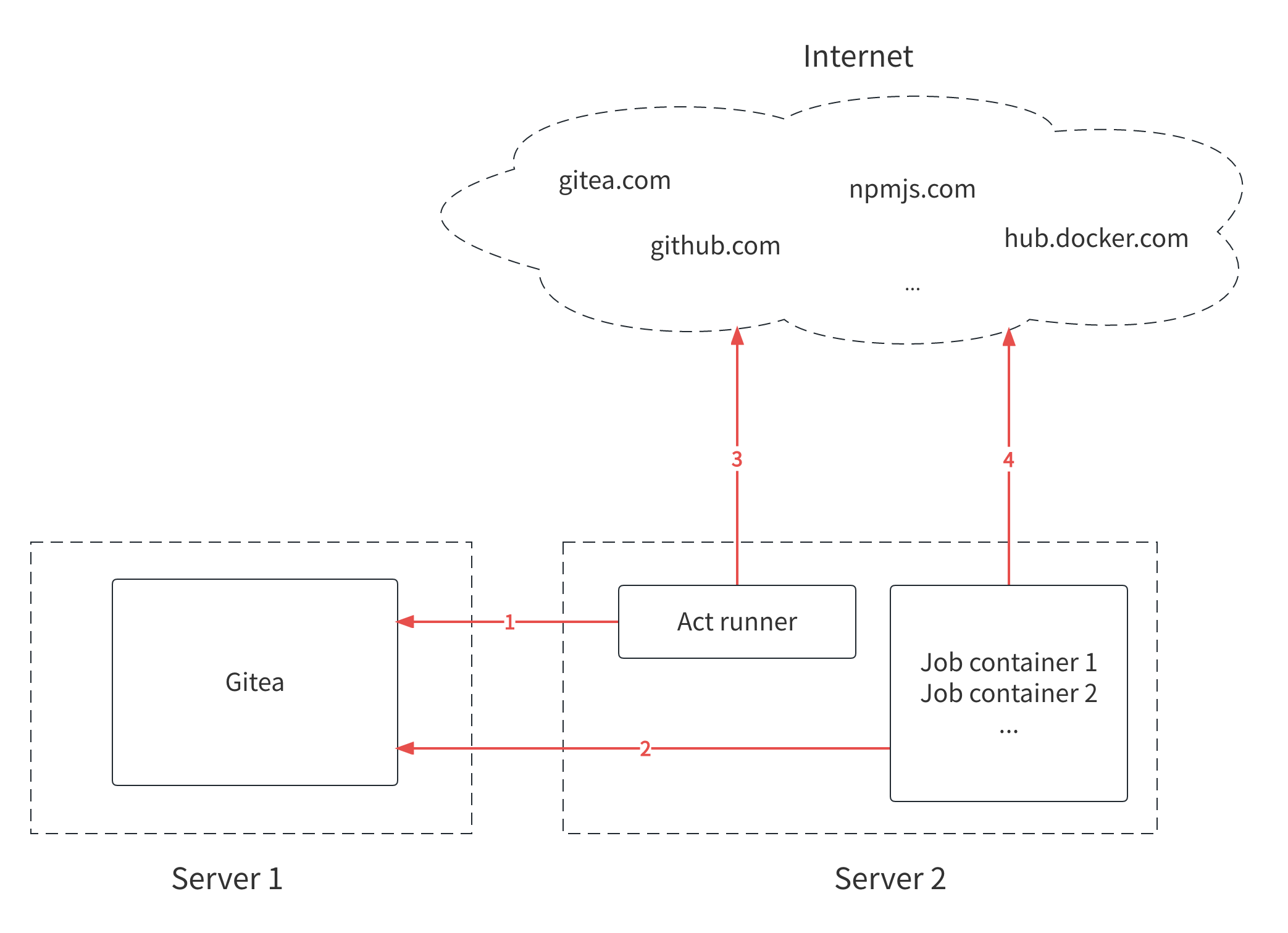
Act Runner 是一个管理者,首先使用令牌在指定的 Gitea 实例上注册,并通过声明自己的 lable 向 Gitea 报告它可以运行的 Job 类型。
当触发条件满足时,Act Runner 为每个 Job 创建并运行相应的 Container;Job 容器负责逐条处理每个步骤和动作,有些 action 可能需要从 Gitea 实例获得脚本代码,例如使用了 http://gitea.lan/actions/checkout@v3
Act Runner 运行需要加载 Job 镜像,可能位于 dockerhub 上;也可能需要从 github.com 或 gitea.com 下载脚本代码,因此可能需要访问互联网。
Job 容器执行 action 脚本时,可能也需要从互联网下载资源,例如 ubunut 的软件包、npm 的软件包等,因此也可能访问互联网。
Runner 能够连接到 Gitea 实例是必须的,互联网访问是可选的。但如果没有互联网访问,管理员需要确保所使用的 image、action 及其资源依赖都在内网中。
三、安装步骤 Act Runner 二进制代码下载页面:https://gitea.com/gitea/act_runner/releases
Act Runner 需要创建并调用 Runner 作为 Job 的工作负载,支持 Ubuntu、MacOS 和 Windows2019 等操作系统。
Ubuntu 的 Runner 镜像支持最新的 3 个 LTS 版本(20.04,22.04,24.04),并进一步分为 slim、standard、full 等子版本,区别就是预装 node、jvm、gcc、go 等常用软件的数量,详细软件清单参见Ubuntu 22.04 版本说明
1. 在 Gitea 注册 1 2 3 4 5 6 7 8 ./act_runner generate-config > config.yml ./act_runner register --no-interactive --instance <instance_url> --token <registration_token> --name <runner_name> --labels <runner_labels> ./act_runner daemon -c config.yml
注册成功后,会在安装目录下有一个隐藏文件.runner,用于管理有效注册数据。
1 2 3 4 5 6 7 8 9 10 11 12 13 { "WARNING": "This file is automatically generated by act-runner. Do not edit it manually unless you know what you are doing. Removing this file will cause act runner to re-register as a new runner." , "id": 5 , "uuid": "b10307c2-7df3-46ca-88b7-6ffb06035a18" , "name": "Runner" , "token": "e4c2f662d3479e81ba40e7dba73911b6a073409e" , "address": "http://gitea.lan" , "labels": [ "ubuntu-latest:docker://gitea/runner-images:ubuntu-latest" , "ubuntu-22.04:docker://gitea/runner-images:ubuntu-22.04" , "ubuntu-20.04:docker://gitea/runner-images:ubuntu-20.04" ] }
2. docker 启动 act runner docker-compose.yml 1 2 3 4 5 6 7 8 9 10 11 12 13 14 version: "3" services: runner: image: harbor.lan/gitea/act_runner:0.2.11 environment: CONFIG_FILE: /config.yaml GITEA_INSTANCE_URL: "http://gitea.lan" GITEA_RUNNER_REGISTRATION_TOKEN: "YRK2jnTuwJXYTMJCmsH13H0bf0IDp8T9EY86OSwx" GITEA_RUNNER_NAME: "Runner" GITEA_RUNNER_LABELS: "ubuntu-22.04" volumes: - ./config.yaml:/config.yaml - ./data:/data - /var/run/docker.sock:/var/run/docker.sock
config.yml 1 2 3 4 5 6 7 8 9 10 11 12 13 14 15 16 17 18 19 20 21 22 23 24 25 26 27 28 29 30 31 32 33 34 35 36 37 38 39 log: level: info runner: file: .runner capacity: 1 envs: A_TEST_ENV_NAME_1: a_test_env_value_1 A_TEST_ENV_NAME_2: a_test_env_value_2 env_file: .env timeout: 3h shutdown_timeout: 0s insecure: false fetch_timeout: 5s fetch_interval: 2s labels: - "ubuntu-latest:docker://harbor.lan/proxy/gitea/runner-images:ubuntu-latest" - "ubuntu-22.04:docker://harbor.lan/proxy/gitea/runner-images:ubuntu-22.04" - "ubuntu-20.04:docker://harbor.lan/proxy/gitea/runner-images:ubuntu-20.04" cache: enabled: true dir: "" host: "" port: 0 external_server: "" container: network: "" privileged: false options: workdir_parent: valid_volumes: [] docker_host: "" force_pull: true force_rebuild: false host: workdir_parent:
3. 系统自启动 编辑/etc/systemd/system/runner.service
1 2 3 4 5 6 7 8 9 10 11 12 13 14 15 [Unit] Description=Gitea Actions runner Documentation=https://gitea.com/gitea/act_runner After=docker.service [Service] Type=simple Restart=on-failure RestartSec=5 ExecStartPre=/usr/bin/docker-compose -f /opt/runner/docker-compose.yml down ExecStart=/usr/bin/docker-compose -f /opt/runner/docker-compose.yml up ExecStop=/usr/bin/docker-compose -f /opt/runner/docker-compose.yml down [Install] WantedBy=multi-user.target
workflow 的启动阶段,主要任务包括:
docker pull gitea/runner-images:ubuntu-22.04:获得基础镜像,并为当前任务启动容器git clone 'https://github.com/actions/setup-node:下载当前任务需要的 Actions 脚本根据工作流语法,分析并替换所有表达式的变量名称
创建工作目录 /workspace,为后续的代码下载和应用处理提供存储资源
然后,就可以依次执行各个 step 的操作了。
四、工作流配置 对于一个代码库,工作流配置文件保存在隐藏目录中,例如:$REPO/.gitea/workflows/demo.yml
1 2 3 4 5 6 7 8 9 10 11 12 13 14 15 16 17 18 19 name: Gitea Actions Demo run-name: ${{ gitea.actor }} is testing out Gitea Actions 🚀 on: [push ] jobs: Explore-Gitea-Actions: runs-on: ubuntu-22.04 steps: - run: echo "🎉 The job was automatically triggered by a ${{ gitea.event_name }} event." - run: echo "🐧 This job is now running on a ${{ runner.os }} server hosted by Gitea!" - run: echo "🔎 The name of your branch is ${{ gitea.ref }} and your repository is ${{ gitea.repository }} ." - name: Check out repository code uses: actions/checkout@v3 - run: echo "💡 The ${{ gitea.repository }} repository has been cloned to the runner." - run: echo "🖥️ The workflow is now ready to test your code on the runner." - name: List files in the repository run: | ls ${{ gitea.workspace }} - run: echo "🍏 This job's status is ${{ job.status }} ."
Gitea 实例会自动检查 workflow 文件,当触发条件满足时,通知已注册的 Act Runner 执行工作流,并显示处理结果。
1 2 3 4 5 6 7 8 9 10 11 12 13 14 15 16 17 18 19 20 21 22 23 24 25 26 27 28 29 name: Deploy to Nginx on: push: branches: - main jobs: build-and-deploy: runs-on: ubuntu-22.04 steps: - name: Checkout code uses: http://gitea.lan/actions/checkout@v3 - name: Set up Node.js uses: http://gitea.lan/actions/setup-node@v4 with: node-version: 20 - name: Install dependencies run: npm install - name: Build project run: npm run build - name: Set up SSH key uses: http://gitea.lan/actions/ssh-agent@v0.5.4 with: ssh-private-key: ${{ secrets.SSH_PRIVATE_KEY }} - name: Deploy to Nginx server run: | hostname ssh -o StrictHostKeyChecking=no root@${{ vars.NGINX_IP_ADDRESS }} "mkdir -p " ${{ vars.NGINX_ROOT_DIRECTORY }} scp -r dist/* root@${{ vars.NGINX_IP_ADDRESS }}:${{ vars.NGINX_ROOT_DIRECTORY }}
参考文献